The Angelcare AC527 is the best smart baby monitor with breathing and movement tracking for most UK families who want a complete local system. It combines an under-mattress movement pad, 5-inch video parent unit and temperature display without making a phone the main viewer. The Babysense 7 is better value when you only want movement alerts; Owlet and Nanit add richer data but demand more setup, connectivity and spending.
In This Article
- Our direct answer
- Comparison table
- Six monitor reviews
- How to choose
- Tracking types compared
- Setup and false alarms
- Which one should you buy?
- Frequently Asked Questions
Best Smart Baby Monitors: Our Direct Answer
Choose the Angelcare AC527 if you want one purchase covering video, sound and contact-free movement sensing. Its separate parent unit avoids the delay and distraction of opening an app, while the pad has four sensitivity settings. The key limitation is the cot setup: under-mattress pads need the correct support surface and careful positioning, and travel cots or sprung bases may be unsuitable.
Choose the Babysense 7 when video is already covered. Its two passive pads provide wider cot coverage than a single-pad system and the alarm is local, so there is no account or broadband dependency. The Owlet Dream Sock suits parents who deliberately want pulse-rate and oxygen readings from a medically certified wearable for a healthy infant within the stated age and weight range. Nanit is the stronger camera-led choice, but breathing motion depends on compatible patterned clothing and some features sit behind an Insights plan.
None of these products makes an unsafe sleep arrangement safe, guarantees that every concerning event will be detected or prevents sudden infant death syndrome (SIDS). Follow the Lullaby Trust safer-sleep advice regardless of what the monitor displays.
The Best Smart Baby Monitors at a Glance
Compare the tracking method before the feature list. A sensor pad suits a permanent cot, a clip travels easily, a camera gives the best visual context, and a sock collects the most health-related data. The table has no shopping buttons so you can make that choice first.
| Monitor | Our award | Tracking method | Main connection |
|---|---|---|---|
| Angelcare AC527 | Best overall | Under-mattress pad + video | Local parent unit |
| Babysense 7 | Best sensor-pad value | Two under-mattress pads | Local alarm |
| Owlet Dream Sock | Best health-data wearable | Foot sock | Wi-Fi app + base |
| Nanit Pro Wall Mount | Best camera system | Camera + patterned Breathing Wear | Wi-Fi app |
| Snuza Hero | Best for travel | Nappy-clip movement sensor | On-device alarm |
| Sense-U Baby Monitor | Best budget wearable | Nappy-clip sensor | Bluetooth phone app |
Prices and subscriptions change, so the recommendations are based on the practical system rather than a temporary discount. Check whether every required part is included: Nanit breathing monitoring needs compatible Breathing Wear, while some app analytics require a paid plan after any included trial.
Our Six Smart Baby Monitor Recommendations
1. Angelcare AC527 — Best Overall

Angelcare is the most complete option here: a 5-inch video parent unit, sound, room-temperature display and a wireless movement pad. The pad sits beneath a compatible mattress and offers four sensitivity levels, so nothing needs to be clipped to the baby. Its local screen also means routine viewing does not depend on a phone notification or household Wi-Fi.
The movement sequence is specific: the product information states that it gives a preliminary beep after 15 seconds without recognised movement and sounds an alarm after 20 seconds if no movement is detected. That is an alert to check the baby, not a diagnosis. Correct mattress and cot compatibility, pad position and sensitivity matter. An adult bed, bedside arrangement with two occupants, fan vibration or a mobile cot can undermine the reading.
- Buy it if: you want video, sound and contact-free movement alerts in one local system.
- Skip it if: the cot base is incompatible or you need a compact travel solution.
- Main compromise: strong all-round coverage with more installation work than a simple video monitor.
2. Babysense 7 — Best Sensor-Pad Value

Babysense 7 strips away the camera and concentrates on under-mattress movement. Two passive sensor pads cover more of the sleep surface as the baby becomes mobile. The manufacturer states that it alarms after 20 seconds without detected movement or when movement falls below its stated threshold. There is no Wi-Fi, phone app or wearable to recharge.
This is the rational buy if you already own a dependable video monitor or only want a local movement alarm. It is less useful for frequent travel because each new cot needs a compatible rigid setup, and it cannot show why an alert occurred. A baby rolling beyond effective pad coverage, incorrect installation or outside vibration can affect performance.
- Buy it if: you want broad under-mattress coverage without paying for another camera.
- Skip it if: you need video, remote access or a monitor that moves between sleep spaces daily.
- Main compromise: simple local sensing without visual context.
3. Owlet Dream Sock — Best Health-Data Wearable
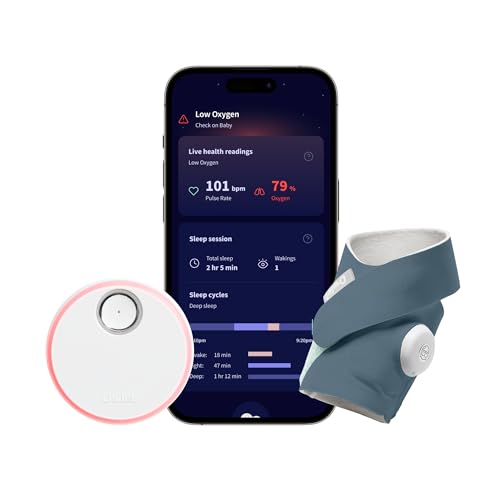
Owlet is the outlier because it tracks pulse rate, oxygen level and sleep trends rather than inferring breathing from mattress movement. This UK model is described as medically certified and intended for healthy infants from birth to 18 months weighing 2.5–13.6kg. Alerts appear on the base station and phone when readings leave preset ranges.
That extra information brings extra responsibility. Fit the correct sock size on the correct foot, inspect the skin and follow the manufacturer’s placement instructions. It needs 2.4GHz Wi-Fi during setup, Bluetooth and regular charging; the listed battery life is up to 16 hours. Treat a concerning reading or an unwell baby as a reason to assess the child and seek appropriate help, not as a number to troubleshoot remotely.
- Buy it if: you specifically want certified pulse-rate and oxygen monitoring within the stated use range.
- Skip it if: data is likely to increase anxiety or Wi-Fi reliability is poor.
- Main compromise: the richest measurements with the most fitting, charging and app management.
4. Nanit Pro Wall Mount — Best Camera System

Nanit is the best video-first system. The wall-mounted 1080p camera gives a consistent overhead view, night vision, two-way audio, sound and motion alerts, and temperature and humidity information. Breathing Motion Monitoring uses the camera to recognise the pattern on compatible Nanit Breathing Wear, so no electronic sensor touches the baby.
The camera cannot track breathing motion through ordinary clothing, a sleeping bag that hides the pattern or a blocked view. Wall mounting is less convenient in rented homes and on trips, although other stand packages exist. Check the current Insights plan because sleep analytics and some smart features may require a subscription after the introductory period. Use the included cord-management system and keep every cable out of reach.
- Buy it if: video quality and an overhead nursery view matter most.
- Skip it if: you want a local screen, no subscription questions or easy room-to-room movement.
- Main compromise: excellent visual context tied to Wi-Fi, the app and compatible clothing.
5. Snuza Hero — Best for Travel

The Snuza Hero clips directly to the nappy and senses abdominal movement. It needs no Wi-Fi, phone, base station or cot pad, and the listing includes a carry case. If movement is not detected, it vibrates after 15 seconds and gives an audible alarm five seconds later. A replaceable battery is stated to last up to six months.
Portability is its advantage, but direct attachment makes fit critical. A loose nappy, thick clothing or a clip that loses contact can trigger an alarm or interrupt monitoring. It does not provide video, remote alerts or sleep history. Check it before every use and remember that anyone outside the room must be able to hear the alarm through a separate audio monitor.
- Buy it if: you want a self-contained movement alarm for different sleep spaces.
- Skip it if: you need remote viewing, phone notifications or health readings.
- Main compromise: excellent portability with no visual or remote context.
6. Sense-U Baby Monitor — Best Budget Wearable

Sense-U is a lower-cost nappy-clip option that reports movement, sleeping position and ambient temperature to a phone. It can alert when movement is weak or the baby rolls into a selected position, and it uses Bluetooth rather than requiring cloud video for the core connection. That can suit a parent sleeping nearby who wants app-based information without installing a camera.
The current product page says direct range is up to 15 metres in open space and that walls can reduce it. Remote access needs the optional base station, so this exact unit is not equivalent to a full Wi-Fi monitor. It is also described as an international product whose instructions and labelling may differ. Confirm the supplied documentation, compatibility and support before relying on it.
- Buy it if: you want low-cost phone alerts and will remain within Bluetooth range.
- Skip it if: you need dependable whole-house range or UK-specific support certainty.
- Main compromise: useful data at a lower cost, but the weakest range and support proposition here.
How to Choose a Breathing or Movement Monitor
Decide What You Actually Need to Detect
“Smart monitor” covers several different jobs. A pad or nappy clip detects small body movements; Nanit estimates breathing motion from a visible pattern; Owlet measures pulse rate and oxygen at the foot. Video motion detection merely reports that something changed in the picture and is not the same as breathing monitoring. Buy the narrowest system that answers your concern instead of assuming more graphs mean more safety.
Match It to the Sleep Space
Under-mattress pads need a compatible mattress and firm base. Wearables need reliable skin or nappy contact. Camera tracking needs a clear fixed view and approved clothing. Check bedside cribs, travel cots, unusual mattresses and shared rooms carefully. Our guide to setting up a safe sleep space covers the sleep arrangement before technology is added.
Choose a Local Screen or an App
A local parent unit is fast, private by design and continues working when broadband fails, but its range is limited. An app can be checked from more places and store history, but introduces accounts, updates, Wi-Fi coverage and notification settings. Read our screen versus app monitor comparison before choosing the connection around the tracking feature.
Check Ongoing Costs and Replacement Parts
Look beyond the device price. Socks and bands are outgrown, batteries age, adhesive or mounting parts may need replacement, and advanced app features may require a subscription. Confirm which features work without a plan and whether the product remains useful after breathing monitoring is no longer wanted.
Sensor Pads, Wearables and Camera Tracking Compared
Under-Mattress Sensor Pads
A pad is contact-free and easy to leave installed. It suits one stable cot and avoids charging something worn by the baby. The drawback is environmental sensitivity: mattress construction, slats, nearby vibration and where the baby lies all matter. Pads report movement, not the cause of a change, and they cannot give a visual check.
Wearable Sensors
A wearable follows the baby rather than the mattress, making it more portable and less affected by cot construction. The trade-off is contact and routine: correct size, secure fit, charging or battery checks, clean fabric and skin inspection. A clip and a pulse-oximetry sock also measure different things, so do not compare their alerts as if they were interchangeable.
Camera-Based Breathing Motion
Camera tracking adds context because you can see position, bedding and whether someone is attending the cot. Nanit avoids an electronic wearable, but it still requires its patterned clothing to remain visible and the camera to stay aligned. Ordinary camera motion detection is not breathing tracking. For safe mounting and cord clearance, see our guide to positioning a baby monitor camera.
Setup, False Alarms, Connectivity and Ongoing Costs
Test Before the First Night
Install the monitor in daylight, follow the exact instructions and deliberately test the alert sequence. For a sensor pad, remove pressure as instructed and check the alarm. For a wearable, confirm fit and that the app receives data. For a camera, check the full mattress remains visible in darkness. Never test by putting a baby into an unsafe position.
Understand False Alarms
An alarm can come from lost sensor contact, a baby moving outside a sensing area, an incompatible mattress, a blocked camera pattern, flat battery, weak signal or incorrect sensitivity. Check the baby first. Then investigate the device. Repeated unexplained alarms deserve attention rather than automatic dismissal, especially if the baby appears unwell.
Secure the Connection
For Wi-Fi monitors, use a unique account password, enable multi-factor authentication if offered, keep firmware and apps current, and remove access for old phones. Put internet-connected nursery equipment on a separate guest or device network if your router supports it. Our Wi-Fi baby-monitor security guide explains the practical steps, while our range guide covers walls and interference.
Plan for Power and Travel
A local pad may stay ready for months, while a sock must be charged routinely and a phone app depends on the handset as well as the monitor. Check low-battery behaviour and what happens during an internet outage. If travel is frequent, the Snuza has the fewest dependencies; see our guide to using a baby monitor in a hotel room for sockets, range and supervision limits.
Which Smart Baby Monitor Should You Buy?
Buy the Angelcare AC527 if you want one coherent local package. It gives most families the cleanest balance of video, sound, temperature and contact-free movement alerts. Buy the Babysense 7 when you already have video and want a simpler pad system. Both require a compatible permanent cot setup.
Buy the Owlet Dream Sock only when you deliberately want pulse-rate and oxygen data and are comfortable managing fit, charging and app connectivity. Choose Nanit when the overhead camera and visual context matter more than a local screen. The Snuza is the practical travel pick; Sense-U is the budget phone-connected clip, but its range and international-product caveat make it less convincing as a main monitor.
If monitoring data is likely to intensify anxiety, a dependable video or audio monitor plus a safe sleep setup may be the better purchase. Our evidence-led guide to whether movement monitors are worth it examines that wider decision.
Frequently Asked Questions
Do breathing monitors prevent SIDS?
No. Consumer breathing and movement monitors do not make an unsafe sleep arrangement safe and should not be presented as preventing SIDS. Follow current safer-sleep guidance.
Which type gives the fewest false alarms?
No type is immune. A well-installed sensor pad avoids wearable fit problems, while a correctly fitted wearable avoids cot-base compatibility problems. The best choice is the one that suits the actual sleep space and is tested regularly.
Can a movement sensor go under any mattress?
No. Mattress thickness, material and the cot base can affect detection. Follow the exact compatibility and placement instructions for the selected model.
Is a smart sock better than a sensor pad?
It provides different information. A sock such as Owlet can measure pulse rate and oxygen, while a pad detects movement through the mattress. The sock needs correct fit and charging; the pad needs a compatible fixed cot.
Do I need Wi-Fi for breathing monitoring?
Not always. Angelcare, Babysense and Snuza can give local alarms without Wi-Fi. Owlet and Nanit use connected apps for their main smart features, while Sense-U uses Bluetooth for direct phone connection.
What should I do when a monitor alarms?
Check the baby first rather than silencing the device from another room. If the baby is unresponsive or not breathing normally, follow emergency guidance and call 999. Afterwards, check fit, placement, power and signal before using the monitor again.